

header img

One Year..
And your kid becomes a junior IT.

عام واحد
ويصبح إبنك خبير في تكنولوچيا المعلومات

Features

Flexible

Flexible dates, On the weekends.



Fun

Keeping your child entertained through fun activities during break time.
Inclusive

Fully comprehensive course covering main aspects of information technologies.



Professional

Course materials are carefully selected to suit child mentality in a professional way.

For 7+ Kids

Levels

    • • Introduction to the Basics of Computer
    • • Advantages & Disadvantages of Computers
    • • Basic Applications
    • • Types of computer operating systems
    • • Components of Computer System
    • • Computer Memory
    • • Windows Settings
    • • Control panel
    • • Display properties

    • • Creating workbooks & Navigating workbooks
    • • Working with rows, columns and cells
    • • Creating charts and graphs & Sorting and Filtering
    • • Presentation dos and don'ts
    • • Text, bullet, graphics, images, objects and shapes
    • • How to add audio and video to a presentation
    • • The animation pane and motion paths
    • • Character formatting
    • • Working with Tables in Word including formatting, converting data and formulas
    • • Inserting graphics, pictures, shapes, icons and 3d models
    • • Create an Index & Printing

    • • Intro to Computer Hardware
    • • Understanding computers architecture
    • • Understanding motherboard technologies
    • • Understanding processor technologies
    • • Understanding memory & storage technologies
    • • Printers & scanners

    • • Network topologies and concepts
    • • Routers, switches, wireless and access points
    • • IP Addressing & Subnetting
    • • Virtual Private Networks (VPN)
    • • Network Security
    • • Network Planning & Designing Process

    • • web design concepts
    • • Intro to HTML & CSS
    • • CSS flexbox & grid
    • • Responsive website
    • • Intro to Java Script
    • • different frameworks
    • • UX/UI concepts
    • • Clean coding
    • • Create your first website
    • • Different hosting options

    • • Write the first program
    • • Python basic data types and variables
    • • Input/output and decisions making
    • • While & For loops
    • • Functions & Iterators
    • • Using data structures
    • • Exception handling
    • • Object-oriented programming

levels icon

Apply for our courses

Your request will be submitted and you will receive a confirmation email.

Frequently Asked Questions

  • No, each level has it's own subject and they are not connected, however it's advised to attend them from the easiest to the hardest.

  • Fawry.

  • Within 7 days from booking and 10 days before the course starts.

  • 5 kids per class.

  • our location

faqs icon

المميزات

مرونة المواعيد

مرونة في المواعيد؛ ايام العطلات الاسبوعية


مرح

تحفيز الطفل بأنشطة ومرح بين المحاضرات

تغطية متكاملة

تغطية لأركان تكنولوچيا المعلومات من خلال محتوى متكامل


إحترافية

مادة علمية إحترافية منتقاة تناسب عقلية الطفل

للأطفال من عمر 7 أعوام

levels icon

المراحل

    • مقدمة في الكومبيوتر
    • مميزات وعيوب جهاز الكومبيوتر
    • تطبيقات
    • أنواع نظم التشغيل
    • مكونات نظام جهاز الكومبيوتر
    • ذاكرة الكومبيوتر
    • اعدادات الكومبيوتر
    • لوحة التحكم
    • خصائص الظهور

    • انشاء wrokbook وكيفية تصفحة
    • التعامل مع الصفوف والأعمدة والخلايا
    • Creating charts and graphs & Sorting and Filtering
    • مايجب فعله ويجب عدم فعله في عرضك التقديمي
    • النصوص و الصور و الاغراض والأشكال
    • كيفية اضافة صوت وفيديو في العرض التقديمي
    • The animation pane and motion paths
    • تشكيل الحروف
    • التعامل مع الجداول وتغيير شكلها وتنظيمها وتحويلها من صورى لاخرى
    • اضافة الصور والأشكال والأيقونات
    • عمل فهرس وطباعة المستند

    • مقدمة في أجزاء الكومبيوتر
    • فهم بناء جهاز الكومبيوتر
    • فهم تقنيات الماذربورد (اللوحة الأم)
    • فهم تقنيات معالج البيانات
    • فهم ذاكرة الكومبيوتر وتقنيات تخزين البيانات
    • الطابعة والماسح الضوئي

    • مفاهيم وتقنيات الشبكات
    • المحولات و الناقل اللاسلكي ونقاط التوصيل
    • عنوان برتوكول الانترنت
    • الشبكات المحمية (VPN)
    • حماية بيانات الشبكة
    • تخطيط وتصميم الشبكات

    • مفاهيم تصميم المواقع
    • HTML & CSS مقدمة في
    • في العرض كشبكة والعرض في صندوق مرن css خواص ال
    • تصميم موقع متجاوب
    • مقدمة في جافا سكريبت
    • إطارات العمل المختلفة
    • مفاهيم تجربة المستخدم
    • كتابة الكلين كود او الكود المفهوم
    • إنشاء موقعك الإلكتروني الأول
    • طرق إستضافة المواقع المختلفة

    • كتابة برنامجك الأول
    • أنواع البيانات المختلفة والمتغيرات في لغة بايثون
    • إستقبال وإظهار البيانات وأخد القرارات
    • حلقات البرمجة
    • While & For loops
    • الدالات ودالات التكرار
    • إستخدام هيكلة البيانات
    • حل المشكلات البسيطة
    • الإستثناءات لتجنب الأخطاء
    • البرمجة بمنهج الكائنات

سجل الآن في إحدى دوراتنا

.سيتم تسجيل طلبك و إرسال التأكيد على بريدك الإلكتروني

أسئلة متكررة

faqs icon
  • لا, كل محتوى مستقل بذاته ولا يرتبط بغيرة لكن يفضل التدرج من حيث السهل للأصعب
  • فوري
  • خلال اسبوع من الحجز وقبل بداية الكورس ب ١٠ أيام
  • ٥ أطفال للدورة
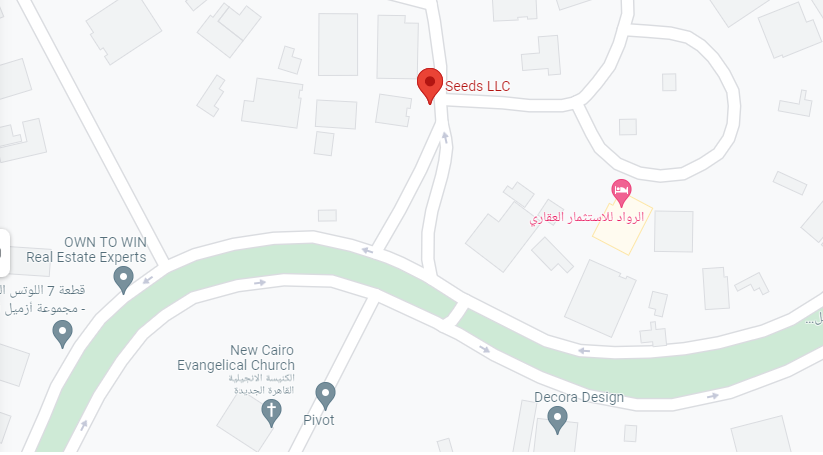
  • our location